Enabling Native Call Recording on a UK Samsung Galaxy S23 Ultra (CSC Change)🔗︎
Introduction🔗︎
Samsung disables native call recording on UK/EU phones (CSC EUX) for regulatory reasons. You can enable it — without root, without a factory reset, without voiding Knox — by changing the phone's CSC (Consumer Software Customization) code to a region where the feature is allowed. I used the free SamFw Tool over ADB to switch my SM-S918B from EUX to INS (India). Total time: about 15 minutes, plus a backup beforehand as insurance. Result: native call recording, transcription, and spam/Caller ID detection, all built in — no third-party app required.
Note
Although this write-up is for a Samsung Galaxy S23 Ultra, the process should be available for other Android devices. SamFw supports other manufacturers, but your mileage may vary.
TL;DR🔗︎
Jump straight to the steps.
The problem🔗︎
Samsung phones sold in the UK and most of Europe ship with the native call recording feature disabled at the software level, regardless of Android version. It's not hidden in a settings menu somewhere — it's gated by the phone's CSC, a regional configuration profile baked into the firmware.
I'd previously relied on Cube ACR for call recording, and it worked flawlessly — until a recent update made it dependent on Wireless Debugging being enabled at all times. That's fine sat at a desk, but unworkable moving between Wi-Fi access points around the house and garden, since Android disables Wireless Debugging on every network change and it has to be manually re-enabled each time.
That pushed me to look at fixing this properly, at the source: changing the CSC.
What is a CSC?🔗︎
CSC = Consumer Software Customization. It's a regional configuration profile built into Samsung firmware that controls which features are enabled — call recording, Samsung Pay, Caller ID/spam detection — as well as language defaults, carrier settings, and which OTA update servers the phone checks. Changing it doesn't flash a new ROM or root the device; it swaps which region's feature set is active, using firmware that's often already present on the device if it shipped as multi-CSC.
Requirements🔗︎
- Samsung Galaxy phone with a multi-CSC firmware build (most European retail units qualify — check with the tool below)
- Windows PC (SamFw Tool is Windows-only)
- USB cable (data-capable, not charge-only)
- Samsung Smart Switch — for the backup
- SamFw Tool — the tool that changes the CSC
- ADB (Android Debug Bridge) — SamFw bundles its own drivers, so this may not be needed separately; see below
- A Windows Defender exclusion may be needed — SamFw is often blocked as an unsigned, obfuscated binary
- Developer Options + USB debugging enabled on the phone
- A full phone backup, taken beforehand
- 15–20 minutes, + 1.5 hours for backup.
Do you need Android Studio for ADB?🔗︎
No. Android Studio bundles ADB, but installing the full IDE just for one binary is overkill for a one-off task. Google publishes ADB as a standalone SDK Platform-Tools package — a small zip with adb.exe, fastboot.exe, and nothing else:
Download: developer.android.com/tools/releases/platform-tools → platform-tools-latest-windows.zip
Unzip anywhere (e.g. C:\platform-tools) — no installer required.
Note: SamFw Tool bundles its own ADB drivers internally, so depending on version you may not need a separate ADB install at all. Worth checking after installing SamFw before adding anything extra.
Steps🔗︎
Each step below is a one-line summary — expand for the full detail.
1. Back up the phone (Samsung Smart Switch) — more info…
CSC changes don't wipe data, but back up regardless — it's a third-party tool touching firmware config. Connect via USB, select Backup on the phone, and let it run (30–190 minutes depending on data volume).
2. Download SamFw Tool (Windows may block it — see below) — more info…
Official source: samfw.com → Other tools → SamFw FRP Tool . Always download directly from there, not a mirror. Verify before running it:

| File | MD5 |
|---|---|
SamFwToolSetup_v5.6.zip |
9c32068402959416b0896399334e7320 |
SamFwTool.exe |
e1ad3b8bd4f883335e477c3ef6c7b004 |
Get-FileHash .\SamFwToolSetup_v5.6.zip -Algorithm MD5
SamFw is closed-source and commonly flagged by antivirus tools due to code obfuscation — VirusTotal shows 0/92 engines flagging it, worth checking yourself too rather than taking my word for it.
If Windows Defender blocks it: SmartScreen prompt → ... → Keep
anyway. Already quarantined → Virus & threat protection → Protection
history → Allow on device. To stop it being intercepted at all, add a
folder exclusion before downloading (Manage settings → Add or remove
exclusions) — use a dedicated folder, not your general Downloads folder,
and remove the exclusion once done.
3. Enable USB debugging — more info…
Settings → About phone → Software information → Build number — tap 7
times to unlock Developer options, then Settings → Developer options →
USB debugging → ON.
4. Connect the phone to your PC — more info…
Accept the "Allow USB debugging?" prompt on the phone, ticking Always allow from this computer.
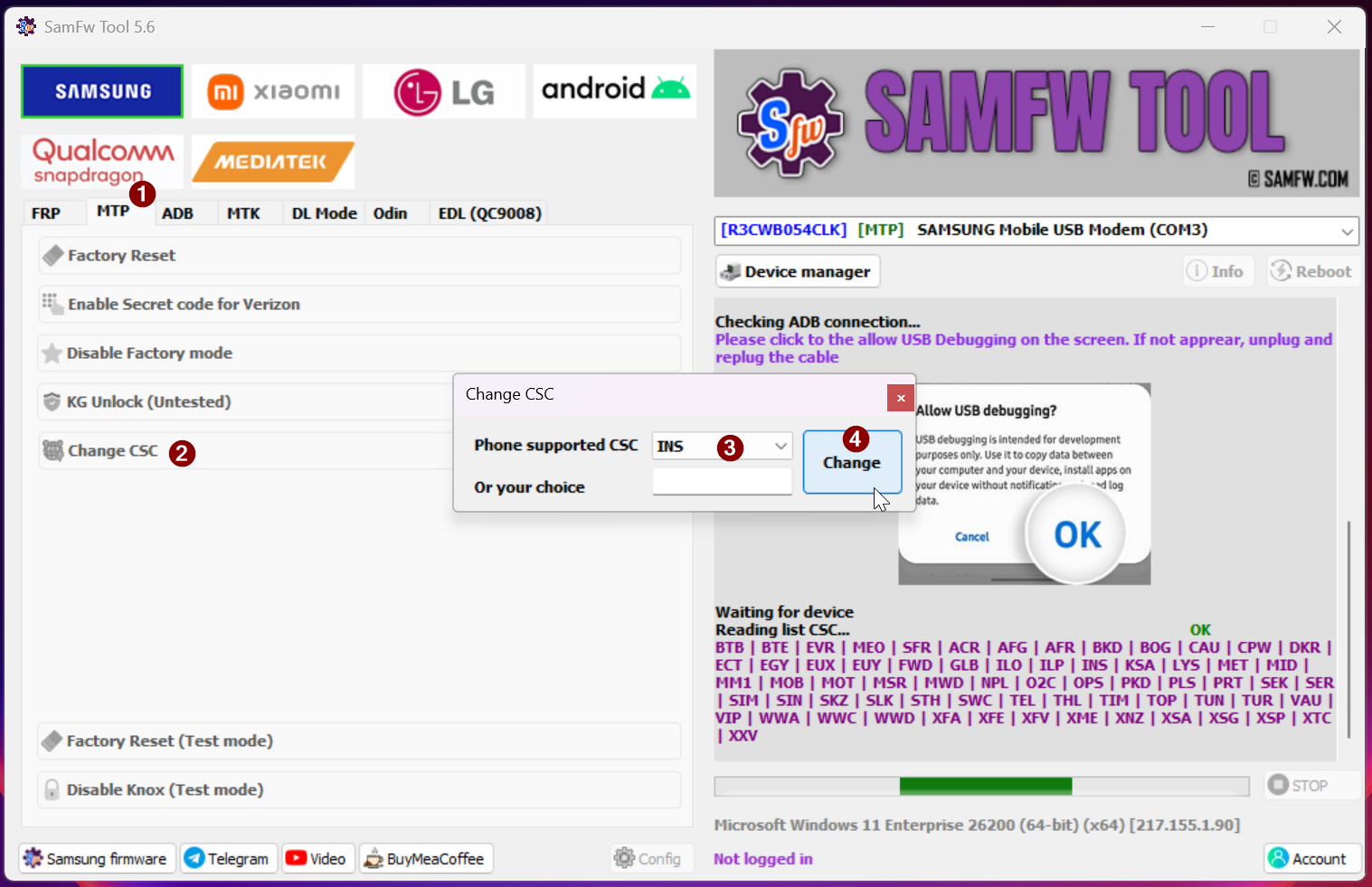
5. In SamFw Tool: MTP tab → Change CSC → Phone supported CSC: INS → Change — more info…
SamFw should auto-detect the phone and show its model/CSC/firmware info. Clicking Change briefly shows the dialer entering a code, then a ~50 second diagnostic screen, then the phone reboots (~2 minutes) and runs an app-optimisation pass — same as after a major OS update. INS is my pick; see CSC options compared below for the trade-offs and other regions.
6. Verify the new CSC, then turn on call recording — more info…
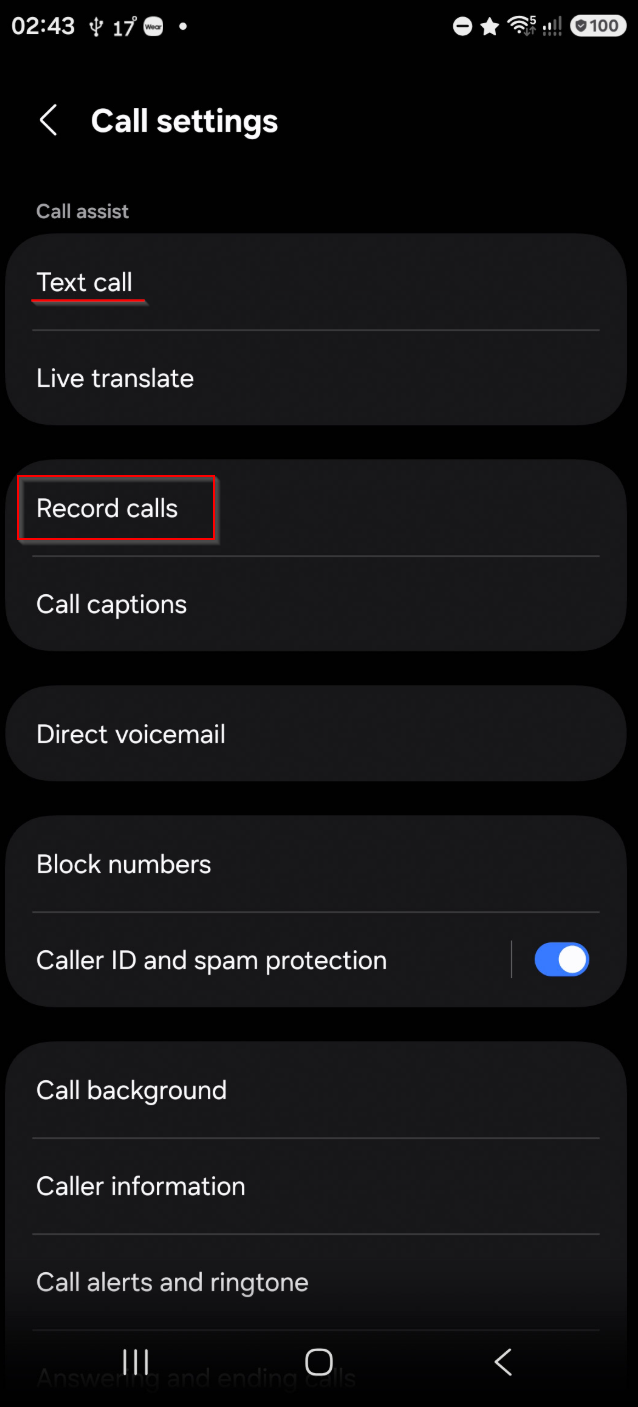
In SamFw Tool, Info → MTP Info should show the new CSC. Then on the
phone: Phone app → ⋮ → Settings → Record Calls → toggle Auto record
calls (or use the manual record button in-call), and double-check
Caller ID and spam protection is still on — it can reset after a CSC
change.
CSC options compared🔗︎
All of these enable native call recording. The differences are in what else changes:
| CSC | Region | Call recording | Caller ID / spam | Samsung Pay | Samsung Health | Notes |
|---|---|---|---|---|---|---|
| INS | India | ✅ | ✅ | ✅ | ✅ | Most widely used/documented; largest support community. Known side effect: occasional SMS from Indian government numbers — block once, done. |
| ILO | Israel | ✅ | ✅ | ❌ | ⚠️ | Best-reported OTA update reliability. Samsung Pay unavailable. Samsung Health Monitor (ECG/BP specifically) reported working on some devices, broken on others — inconsistent across firmware/generations. |
| THL | Thailand | ✅ | ✅ | ⚠️ | ✅ | Good OTA speed reported; Samsung Pay support has reportedly been discontinued on some builds. |
| SEK | Ukraine | ✅ | ❌ | ❌ | ✅ | Loses Caller ID — a real functional downside, not just Samsung Pay. |
| XXV | Vietnam | ✅ | ⚠️ | ✅ | ✅ | Some users report Vietnamese-language text leaking into UI/app elements. |
✅ = generally works · ❌ = generally broken/unavailable · ⚠️ = mixed or inconsistent reports
I went with INS, based on: I rely on Caller ID and spam detection (rules out SEK), don't use Samsung Pay (removes ILO/THL's main advantage), and don't rely on ECG/blood pressure monitoring on my Samsung Galaxy Watch5 (removes ILO's one real asterisk). INS had the most consistent "everything works" feedback across forum reports for my actual priorities.
Source community feedback pulled from XDA Forums threads on S23 Ultra CSC change and S24 Ultra CSC change — individual results vary by firmware build and device generation, so treat the table as directional, not guaranteed.
Limitations worth knowing🔗︎
Limitations
- Doesn't cover VoIP calls (WhatsApp, Signal, Teams, etc.) — native recording only works for genuine cellular calls through the Phone app. This is an Android platform limitation, not something any CSC unlocks.
- Doesn't reliably record Bluetooth audio — headsets, Bluetooth speakers, and car systems (Android Auto) route the caller's incoming audio through a protected path. The other party won't be captured; only your own microphone will. Wired headsets, the earpiece, and the phone's own loudspeaker all work fine.
- Reverting is straightforward — the original CSC (
EUX) remains in the supported list, so you can switch back the same way if needed, with no data loss either way.
Legal note (UK)🔗︎
Legal note
Recording your own calls for personal use is permitted under UK law without informing the other party. If a recording might be used for something the other party wouldn't reasonably expect — as evidence, for business purposes, shared with a third party — that shifts into needing either consent or a legitimate-interest basis under UK GDPR. Check your organisation's own policy before relying on this for anything work-related.
Text call feature🔗︎
I spotted a feature after changing the CSC called Text call (It may have existed before the CSC change). This allows you to answer the call without saying a word. A voice assistant asks the caller questions such as their reason for calling. I have added a quick response that says "Just to let you know, this call is being recorded"
References🔗︎
- SamFw Tool official site: samfw.com
- Android Platform Tools (ADB standalone): developer.android.com/tools/releases/platform-tools
- Samsung Smart Switch: samsung.com/uk/apps/smart-switch
- Cube ACR: cubeacr.app
- XDA Forums 1 — S23 Ultra CSC change thread
- XDA Forums 2 — S24 Ultra CSC change thread