Using AWS Bedrock Models in VS Code GitHub Copilot🔗︎
Goal🔗︎
Use Claude models that I have access to in AWS Bedrock from the GitHub Copilot Chat window in VS Code, authenticating with a Bedrock API key rather than IAM credentials.
What is GitHub Copilot?
GitHub Copilot is GitHub's AI coding assistant. In VS Code it provides inline suggestions and a chat/agent window. Its Bring Your Own Key (BYOK) feature lets the chat window use models from other providers, including your own Bedrock access. BYOK chat works without a Copilot plan, but inline suggestions and semantic search still need one. On Copilot Business/Enterprise, an administrator must enable the BYOK policy.
Cost and governance
Bedrock usage is billed to your AWS account. Make sure appropriate governance is in place (budgets, alerts, quotas and an agreed owner for the account) before giving anyone a key.
TL;DR🔗︎
Jump straight to the steps and the final config.
Using Azure AI Foundry instead?
 There is an equivalent post for Claude models on Azure AI Foundry: Using Azure AI Foundry Models in VS Code GitHub Copilot.
The problem🔗︎
VS Code's Custom Endpoint provider can talk to anything that speaks the Anthropic Messages API, and Bedrock does. The catch is knowing which pieces fit together:
- The Bedrock model ID is not the plain model name. I use an EU inference profile (
eu.anthropic.claude-sonnet-5-5), notanthropic.claude-sonnet-5-5. - The
chatLanguageModels.jsonfile lets you type an API key into it, but VS Code ignores a raw key and sends a blank one. Let VS Code store the key and write an${input:…}reference instead. - The chat session target has to be Local, or the model isn't found.
| Symptom | Cause |
|---|---|
Provider model 'customendpoint/…' is not registered |
The chat session target was set to Copilot instead of Local. |
| Authentication error from Bedrock | The API key was a raw value in the file, so VS Code sent an empty key. |
Converse API vs Messages API
Amazon Bedrock offers two ways to call Claude. The Converse API (/model/{id}/converse) is AWS's attempt to normalise access across providers. It uses one request and response shape (output.message.content) for Anthropic, Amazon Nova, Meta and others, so swapping models should only mean changing the model ID. The Messages API (/anthropic/v1/messages) is Anthropic's native format, the same one used by the first-party Claude API and Azure AI Foundry.
Converse is the better choice for model-agnostic code. However, VS Code's custom endpoint provider only supports chat-completions, responses and messages, and there is no way to transform the response. Pointing it at Converse falls back to the default chat-completions type, which looks for choices in the response and fails with "Response contained no choices". For Copilot, the answer is to set "apiType": "messages" and use Bedrock's Anthropic-native endpoint instead.
Requirements🔗︎
- Access to a Claude model in AWS Bedrock. Model access must be enabled for your account (setup not covered here).
- A Bedrock API key (see Getting an API key).
- VS Code with the GitHub Copilot Chat extension.
-
The Messages endpoint for your region:
https://bedrock-runtime.<region>.amazonaws.com/anthropic/v1/messages
Region, endpoint and model ID must agree
The model must be available in the region you call. The eu. prefix is an inference profile that routes across EU regions; I call it through eu-west-2 (London). Check the Claude in Amazon Bedrock page for model IDs and region support.
Endpoint host
Anthropic's documentation lists a bedrock-mantle.<region>.api.aws host for the Messages API. The bedrock-runtime host above is what I tested and it works.
Getting an API key🔗︎
In the AWS console, open Amazon Bedrock → API keys. There are two types:
| Type | Lifetime | Notes |
|---|---|---|
| Short-term | Up to 12 hours (or the console session, whichever is shorter) | Inherits the permissions of the identity that generated it. AWS recommends it for production. Tied to the region selected when generated. |
| Long-term | Until the expiry you choose | Creates an IAM user with attached policies. AWS says these are for exploration only. |
A short-term key means updating VS Code at least daily, which gets tedious. For a personal or dev account, a long-term key with a short expiry is the practical choice. Treat it as a secret either way.
Steps🔗︎
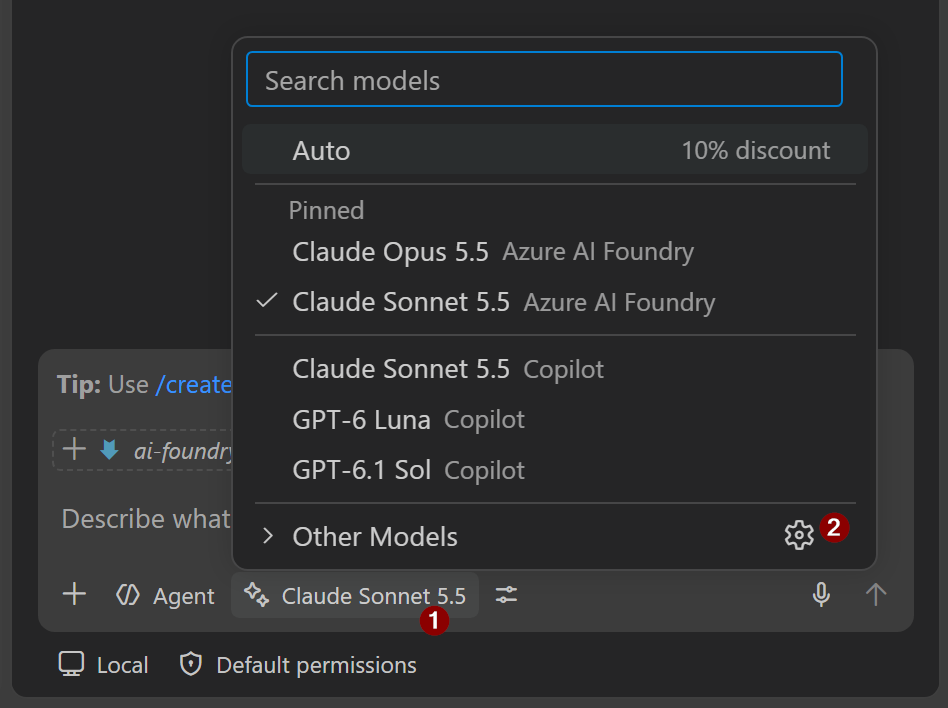
1. Open Manage Language Models — more info…
Click the model picker in the chat input , then the gear icon . Or press F1 and run Chat: Manage Language Models.
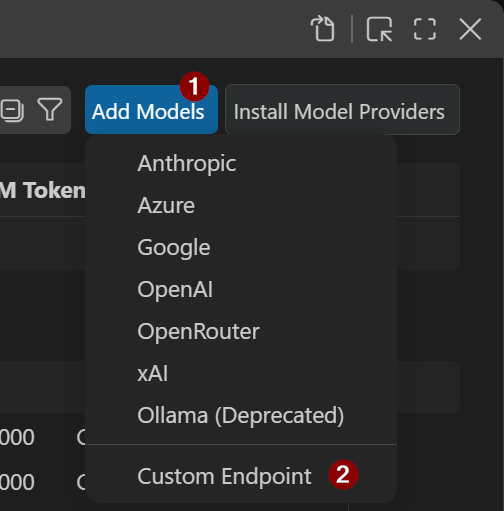
2. Add Models → Custom Endpoint , group name AWS Bedrock — more info…
Name the group whatever you like. This name is what appears in the Language Models editor.
(Top, centre of screen:)

3. Enter API key → Select Messages API type — more info…
In the top centre input, paste in your Bedrock API key and press Enter. Then select Messages as the API type and press Enter. VS Code opens chatLanguageModels.json.
4. Edit chatLanguageModels.json to match the final config — more info…
The file lives at %APPDATA%\Code\User\chatLanguageModels.json. Edit it inside VS Code and save.
Key points:
idis the Bedrock model ID (here theeu.inference profile), and must be unique within the provider.urlis the full…/anthropic/v1/messagesendpoint for your region.apiKey: do not paste in your API key. Apart from being insecure, VS Code won't read it. It should look something like${input:chat.lm.secret.543a845d9}.
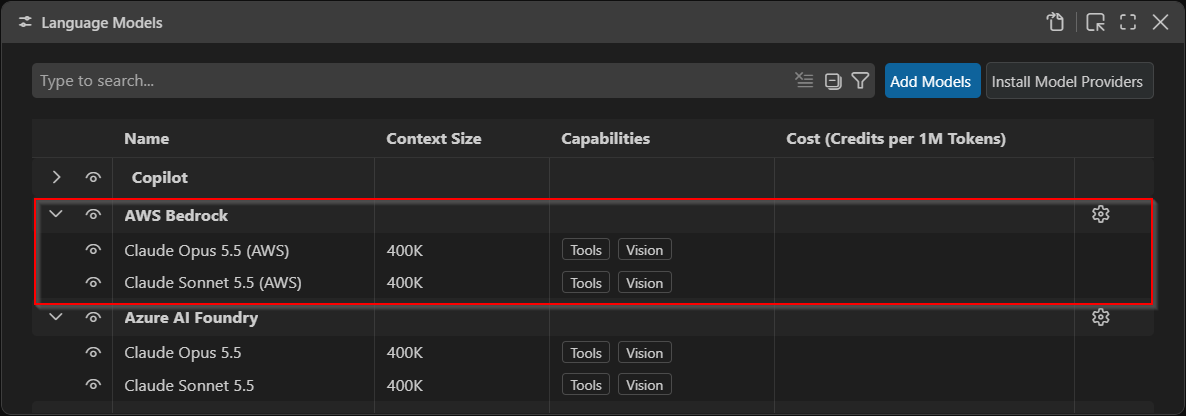
5. Reload the window — more info…
F1 → Developer: Reload Window. Check that the model appears under AWS Bedrock in the Language Models editor, with the eye icon visible.
Pin model
On the right-hand side of the listed models, click the pin so it shows in the chat's model selector.
6. Start a new chat, set the session target to Local, pick the model — more info…
Use a new chat. In the chat input, set the session target to Local (not Copilot or Cloud), then click the picker and choose the Bedrock model . Finally, send a message.
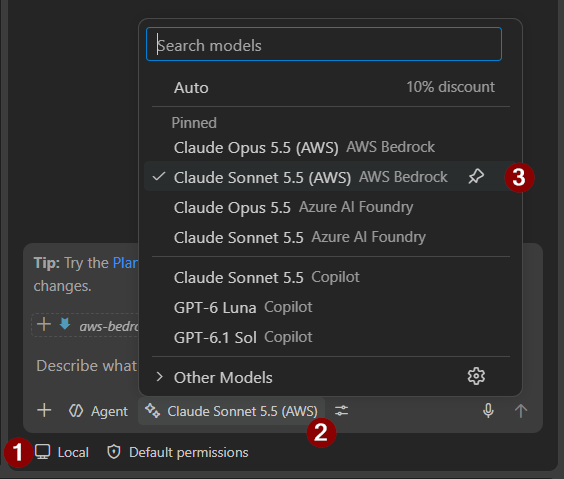
Changing API key🔗︎
The easiest way to change the API key is through the model picker. It automatically stores the key within VS Code, securely (I presume). You will need to do this whenever a short-term key expires.
- In the chat window, click the language model picker → then the gear icon . Or press
F1and run Chat: Manage Language Models.
-
In the Language Models editor, click the gear next to
AWS Bedrockand click Update API Key. -
Paste in your API key and press Enter. This will update
%APPDATA%\Code\User\chatLanguageModels.json.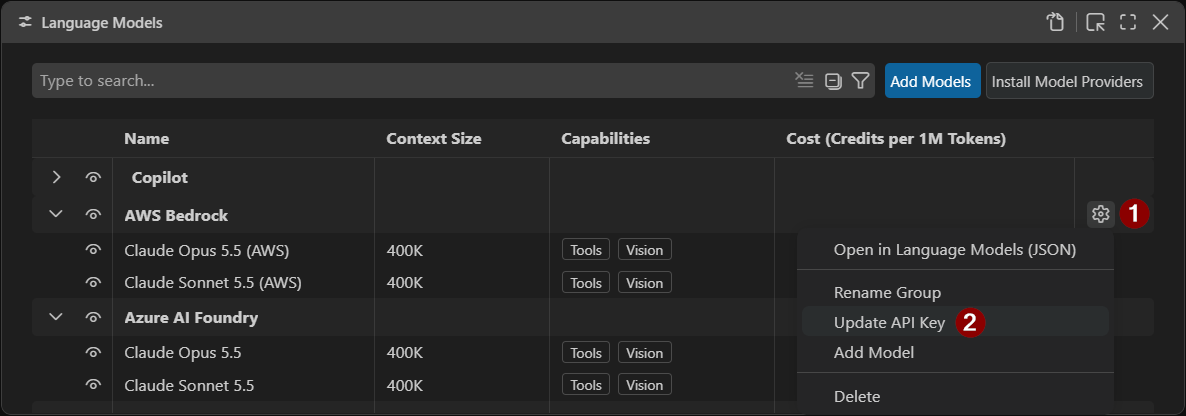
API Key
VS Code handles the key storage (I presume, securely) and writes an ${input:…} reference into the apiKey line. Don't paste the key into the JSON.
Final config🔗︎
Settings for Claude Sonnet 5.5 and Claude Opus 5.5 through the EU inference profile in London.
[
  {
    "name": "AWS Bedrock",
    "vendor": "customendpoint",
    "apiKey": "${input:<written by VS Code>}",
    "apiType": "messages",
    "models": [
      {
        "id": "eu.anthropic.claude-sonnet-5-5",
        "name": "Claude Sonnet 5.5 (AWS)",
        "url": "https://bedrock-runtime.eu-west-2.amazonaws.com/anthropic/v1/messages",
        "toolCalling": true,
        "vision": true,
        "contextWindow": 400000,
        "maxOutputTokens": 32000
      },
      {
        "id": "eu.anthropic.claude-opus-5-5",
        "name": "Claude Opus 5.5 (AWS)",
        "url": "https://bedrock-runtime.eu-west-2.amazonaws.com/anthropic/v1/messages",
        "toolCalling": true,
        "vision": true,
        "contextWindow": 400000,
        "maxOutputTokens": 32000
      }
    ]
  }
]
| Setting | Why |
|---|---|
vendor: customendpoint |
The Custom Endpoint provider. |
apiType: messages |
Bedrock's Claude endpoint speaks the Anthropic Messages API. |
apiKey: ${input:…} |
Written by VS Code when you set the key in the UI. A raw key is ignored. |
id |
The Bedrock Inference Profile ID. Unique per provider, or entries collapse into one. The eu. prefix selects the EU inference profile. (AWS portal > Bedrock > Infer > Inference Profiles > Inference Profile ID) |
url |
Region-specific. Must be a region where the model/profile is available. |
toolCalling: true |
Required, or the model won't show up for agent chat. |
contextWindow / maxOutputTokens |
Total window and per-reply cap. VS Code works out input as contextWindow − maxOutputTokens. |
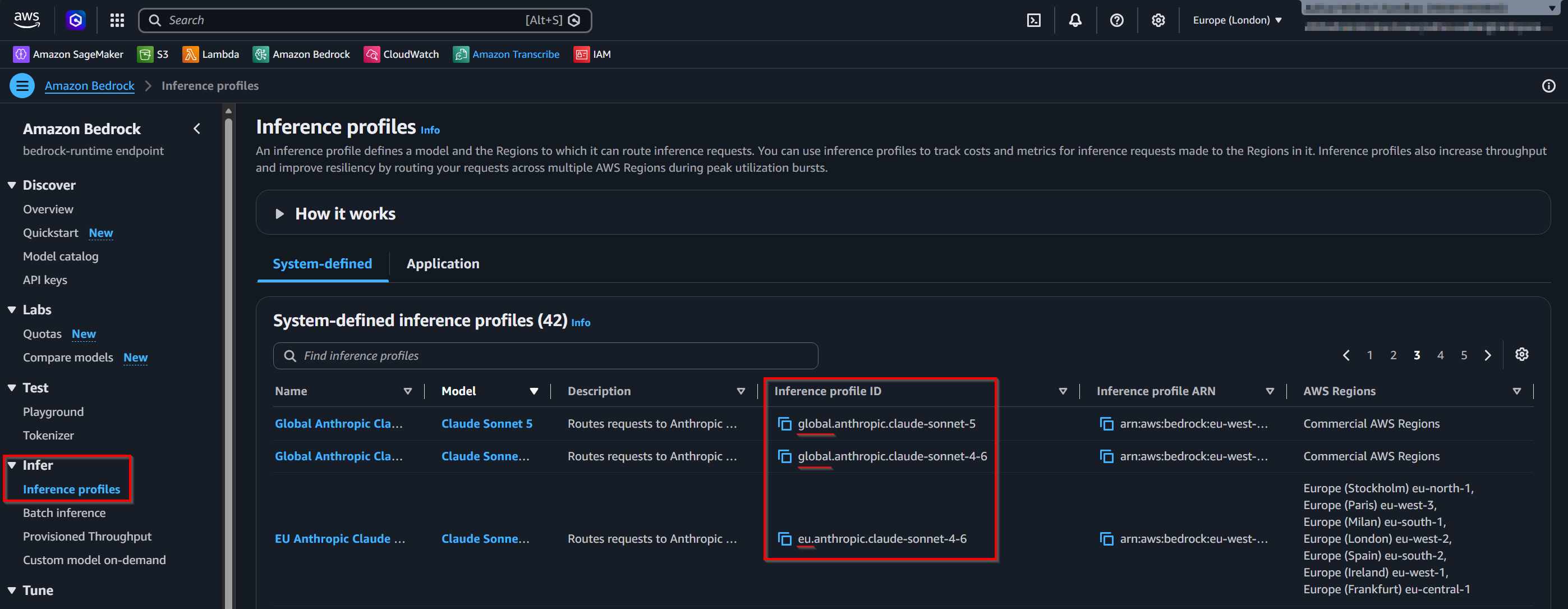
Context window and output🔗︎
- VS Code treats input + output as the model's context window. If you set the two separately, the sum is what the context bar shows.
- Anthropic documents a 1M context window and 128K max output for current Claude models. Check the current docs for your model and platform.
- Larger isn't automatically better. Cost rises, and VS Code warns that quality may decline near the limit. I settled on 400K.
- Bedrock's TPM/RPM quotas are rate limits, not context sizes.
Final thoughts🔗︎
- Static key: A long-term Bedrock key is long-lived and tied to an IAM user, so there is no per-person identity or conditional access. Short-term keys are safer but expire within 12 hours.
- Rotation: If a key is ever pasted into the JSON, a screenshot or a chat, deactivate, reset or delete it in the Bedrock console (API keys) and update it through the VS Code UI.
- Least privilege: Scope the IAM user to the models you need, and use IAM policies to limit who can create keys and how long they last.
- Where to use it: Suitable for personal or dev accounts. For shared or production use, prefer IAM roles or short-term keys with a proper identity behind them.
- Data flow: With BYOK, prompts and workspace context go directly to your Bedrock endpoint rather than through GitHub's service. An
eu.profile keeps inference within EU regions, but check this against your organisation's data policies.
References🔗︎
- AI language models in VS Code
- Claude in Amazon Bedrock
- Amazon Bedrock API keys
- Models overview (Anthropic)